This article will help answer questions about configuring Windows Live Mail for use with ConnectNC Internet Service. If you’re attempting to send mail and have errors, please review this article for help.
Here are the steps you can follow to edit the outgoing server information used by Windows Live Mail.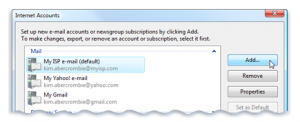
1) In Windows Live Mail, click on “Tools” and then “Accounts” from the menu at the top.
2) Click once on the account you need to configure.
3) Click “Properties.”
4) Click the “Servers” tab.
5) Make sure your mail server address is mail.connectnc.com.
6) Place a check in the box next to “Outgoing mail requires authentication.”
7) Click the “Advanced” button and make sure you’re just using the same information as the incoming mail server.
8) Make sure the there’s no check next to the box that has the server require a secure connection.
9) Uncheck “Leave a copy on the server.”
10) Save your settings and then send a test message.

How do I enable SMTP authentication in Outlook 2010
/in Email, FAQ's/by ConnectNCHow do I enable SMTP authentication in Outlook 2007
/in Email, FAQ's/by ConnectNCHow do I block someone from sending me emails?
/in Email, FAQ's/by ConnectNCLeave Copy of Message on Server Outlook 2007
/in Email, FAQ's/by ConnectNCIf you would like the server to clear the messages when you download them to your computer follow the same steps above just in step 8 make sure the box is NOT checked
Why am I being prompted for username and password after checking mail in webmail?
/in Email, FAQ's/by ConnectNCSometimes when you log into webmail it can take 5-10 minutes (especially if you just close out and not logoff) for the the server to realize that you are no longer logged into the mailbox. The system will only allow one connection to the email box at a time and it was picking up duplicate connections therefore causing the error of bad login.
Configuring Thunderbird for ConnectNC Mail
/in Email, FAQ's/by ConnectNCThese instructions were created on a Mac. the configuration may look a little different if you’re using the Windows operating system.
After downloading and installing Thunderbird, run the application and follow these directions.
Make sure the incoming server type is POP.
The POP port number must be 110.
The SMTP server port must be 25.
Click on “Re-test Configuration” and then Click the “Create Account” button.
Editing Windows Live Mail Outgoing Mail Server Settings
/in Email, FAQ's/by ConnectNCThis article will help answer questions about configuring Windows Live Mail for use with ConnectNC Internet Service. If you’re attempting to send mail and have errors, please review this article for help.
Here are the steps you can follow to edit the outgoing server information used by Windows Live Mail.
1) In Windows Live Mail, click on “Tools” and then “Accounts” from the menu at the top.
2) Click once on the account you need to configure.
3) Click “Properties.”
4) Click the “Servers” tab.
5) Make sure your mail server address is mail.connectnc.com.
6) Place a check in the box next to “Outgoing mail requires authentication.”
7) Click the “Advanced” button and make sure you’re just using the same information as the incoming mail server.
8) Make sure the there’s no check next to the box that has the server require a secure connection.
9) Uncheck “Leave a copy on the server.”
10) Save your settings and then send a test message.
Cape Fear Timber
/in Web Design Portfolio/by ConnectNCSPBA
/in Web Design Portfolio/by ConnectNCSouthern Pines Business Association. Conversion from a ColdFusion CMS to easy to use WordPress CMS. Includes a business directory of Southern Pines, NC business members.