Once you receive an encrypted message from our practice by email, you will complete the following steps.
You will receive a message that looks like this:
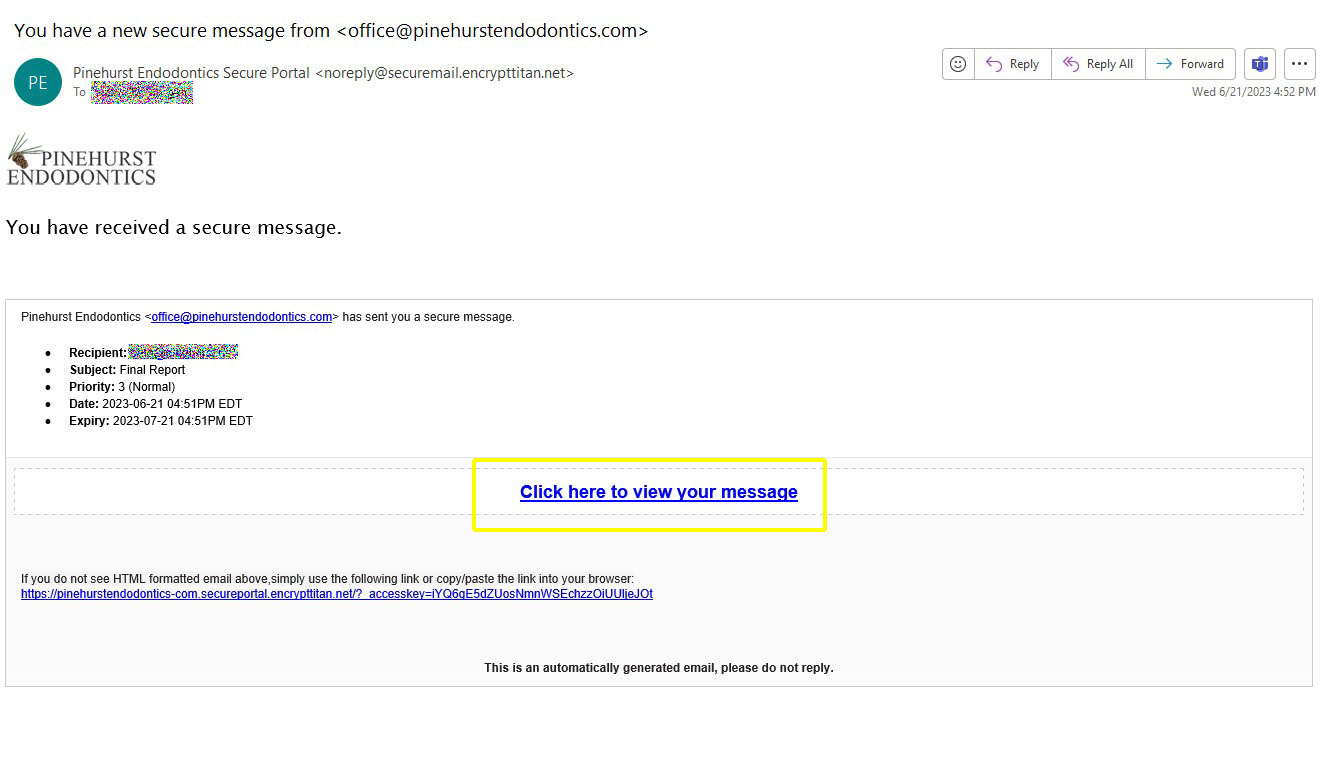
Click on the link that says, “Click here to view your message.”
The link will take you to our secure message portal, where you will see your message. If you have not yet created a password for our secure message portal, you will be prompted to do that before you can view the message.
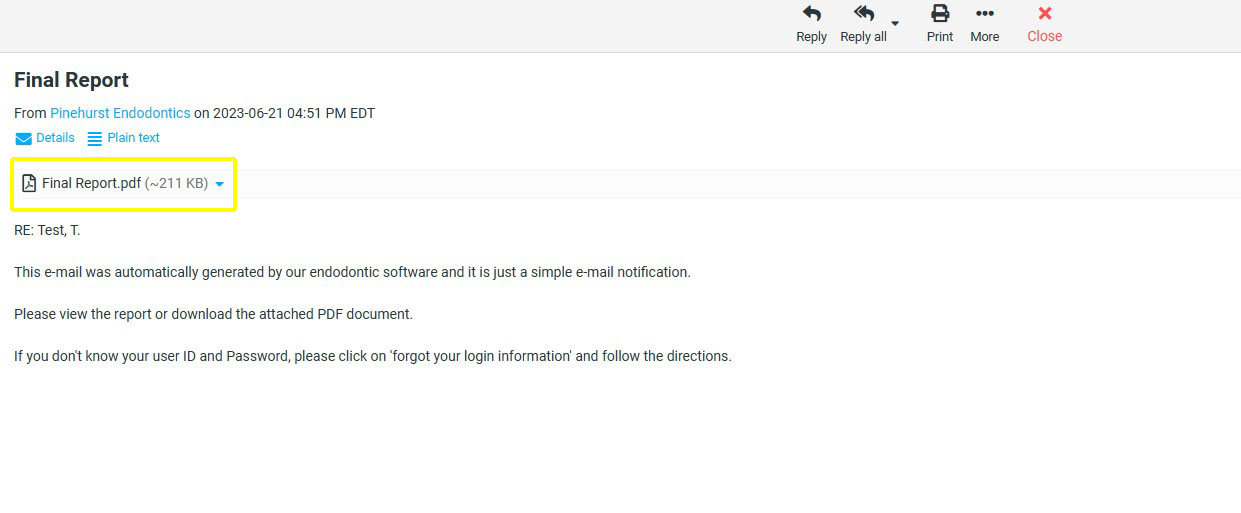
In order to view the full report, please click on the link that says, “Final Report.pdf.”
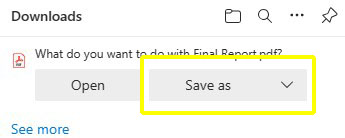
When you click on the link, depending on your browser settings, you may see an option for saving or simply viewing the PDF document. If you have trouble with this step, please contact your IT department.
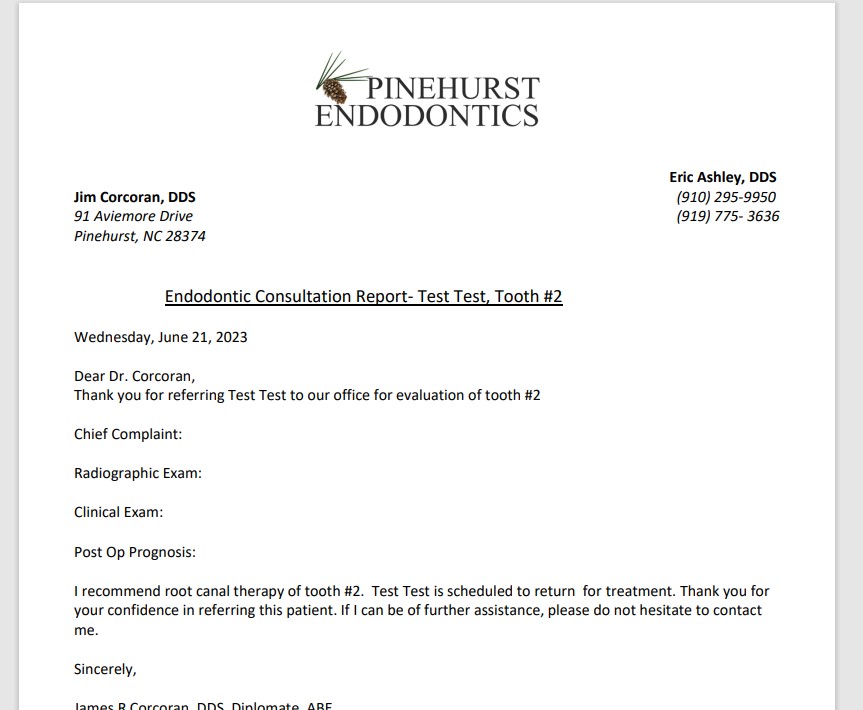
Whether you save or view the PDF, you will see something like the example below when opening the document.

Forwarders in cPanel when customer forwarding is turned off
/in cPanel, Web Hosting/by ConnectNCIt’s not always a good idea to allow clients to forward email. In fact, sometimes it’s a bad idea, and can result in damaged domain reputation and lots of deliverability problems. You can turn off forwarding for a client by going into Feature Manager in WHM. Uncheck the Forwarder Manager feature in the feature list and save.
After that, you will need to add necessary forwarders at the command line.
The contents of the file should look like this:
This is the format
Email address to forward: Email address receiving the message
someone@mydomain.com: myotheraddress@myisp.net
*: “:fail: No Such User Here”
Make sure you test!
Temporary email issues with gmail
/in Email, security/by ConnectNCIn Person Support and Office or Home Visits
/in FAQ's/by ConnectNCDear Clients,
For the foreseeable future, ConnectNC staff will not be making in-home or office visits to our customers. We will also not be taking any appointments in our office in Southern Pines. We have instructed our staff to work from home until further notice.
How to get support:
We are not be able to provide remote assistance or phone support for smart phone and tablet issues, but we are glad to send video or written instructions when possible.
Please stay safe and in good health.
Working from home
/in Featured Services/by ConnectNCProtected: Eagle Bear
/in Web Hosting Frequently Asked Questions/by ConnectNCPHP Update Required warning in WordPress
/in Web Hosting, Wordpress/by ConnectNCIf your WordPress site was built a long time ago, when PHP 5 was in use (or PHP 7.1), you may now be seeing this warning when you login to your WordPress dashboard. It says, “PHP Update Required,” and goes on to tell you that your site is running on an insecure version of PHP.
It’s important that you don’t ignore this warning. The insecure versions of PHP won’t be receiving any patches or updates. They are vulnerable to exploits.
Why doesn’t my hosting company just update my PHP? A lot of hosting companies held off on updates until now because many sites will simply break when updated. Some WordPress themes, especially custom-coded themes, were created some years ago, while PHP 5 was still current. Some PHP syntax has changed since then, which means old code won’t function.
How will I know if my theme will break when I update PHP? You won’t know until you try it, unfortunately.
If your site was constructed more than 6 years ago, please get in touch with us to work with you to update your PHP and your theme, of needed.
Phishing Alert – Counterfeit Quarantine Report
/in Email, Security Tip/by ConnectNCPlease be aware of a phishing email that may land in your inbox. Delete this message and do not click on any links within the message. The message is made to look like a spam quarantine report, but the links lead to a malicious website.
Always verify the return address of an unfamiliar sender or any suspicious messages. In the image below, you can see that the return address name was forged. You can also see that there are some errors in the message body.
How do I change how my name appears in messages I send in Outlook?
/in Email/by ConnectNCLet’s say your name is Mary Smith, nut you want your outbound messages from Outlook to come from M. Smith and not Mary Smith.
To change the way your name looks on messages you send in Outlook, follow these steps. We are going to assume that you’re using Windows 10.
ECC manufactures hollow plastic balls in North Carolina
/in FAQ's/by ConnectNCECC, LLC is a North Carolina manufacturer of hollow and solid plastic balls used by industry and public works for a variety of purposes. One recent deployment took place in Raleigh, North Carolina’s EM Johnson Water Treatment Plant. The City is using these black hollow floating balls to keep sunlight from evaporating water from the reservoir there. These shade balls, as they are also known, block sunlight from penetrating the water. That has a secondary benefit of reducing the amount of chemicals they need to keep algae from growing.
Recently the City of Raleigh produced a video to showcase the new method, which used the floating balls made right here in North Carolina by ECC, LLC.